
 Home
Home  Apps
Apps  Games
Games  Windows
  Topics
  Terms of Service
  Cookies & Privacy Policy
  Disclaimer
FoxFi Key (supports PdaNet)


Information
- Category: Communication
- Price: Paid
- Age Rating: /
- Rating: 3.7
- Developer: FoxFi Software
- Version: 1.2
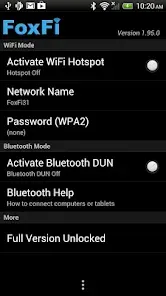

FoxFi Key unlocks the full potential of the FoxFi app, enabling users to share their mobile data connection without rooting their devices. Compatible with PdaNet, it provides a seamless tethering experience, allowing you to connect your devices to the internet effortlessly. Enjoy high-speed data sharing on the go, whether for personal use or work, all while maintaining your device's security and integrity. Experience the freedom of mobile connectivity with FoxFi Key.
Features of "FoxFi Key (supports PdaNet)"
FoxFi Key is an application designed to enhance the functionality of PdaNet, allowing users to share their mobile data connection with other devices. One of its primary features is the ability to create a Wi-Fi hotspot without requiring root access, making it accessible for a wider range of users. This feature is particularly beneficial for those who want to share their internet connection with laptops, tablets, or other smartphones.
Another notable feature is the seamless integration with PdaNet, which provides additional options for tethering. Users can connect via USB or Bluetooth, offering flexibility depending on their needs. The app also includes a user-friendly interface that simplifies the process of setting up and managing connections. Additionally, FoxFi Key supports various Android devices, ensuring compatibility across a broad spectrum of smartphones. The app is designed to maintain a stable connection while minimizing battery drain, which is crucial for users who rely on tethering for extended periods.
How to Use "FoxFi Key (supports PdaNet)"
Using FoxFi Key is straightforward and user-friendly. First, download and install the app from the Google Play Store. Once installed, open the app and grant any necessary permissions it requests. The main screen will display options for creating a Wi-Fi hotspot, USB tethering, or Bluetooth tethering. Choose the desired method based on your needs.
If you opt for the Wi-Fi hotspot, simply tap the corresponding button to activate it. You can customize the network name and password for added security. For USB tethering, connect your Android device to your computer using a USB cable, then select the USB option in the app. Follow any on-screen prompts to complete the setup. For Bluetooth tethering, ensure Bluetooth is enabled on both devices, pair them, and select the Bluetooth option in the app. Once connected, you can enjoy internet access on your other devices seamlessly.
Pros & Cons of the App
Like any application, FoxFi Key has its advantages and disadvantages. One of the primary pros is its ability to create a Wi-Fi hotspot without requiring root access, making it accessible to a broader audience. The app is also easy to use, with a straightforward interface that simplifies the tethering process. Additionally, it supports multiple connection methods, including USB and Bluetooth, providing flexibility for users. The integration with PdaNet enhances its functionality, allowing for a more robust tethering experience.
On the downside, some users may experience limitations based on their mobile carrier's policies, as certain carriers may restrict tethering capabilities. Additionally, while the app is generally reliable, performance can vary depending on the device and network conditions. Some users have reported occasional connectivity issues or slower speeds when multiple devices are connected. Lastly, while the app is free to download, certain features may require a paid upgrade, which could deter some users from fully utilizing its capabilities.
Get Installation Details  Google Play
  App Store
Google Play App Store FAQ
Can I create playlists on Spotify?
Yes, users can create, share, and collaborate on playlists with friends.
Can I download music on Spotify?
Yes, premium users can download songs and playlists for offline listening.
Can I listen to Spotify offline?
Yes, premium users can listen to downloaded music offline without an internet connection.
Can I use Spotify on multiple devices?
Yes, you can use Spotify on multiple devices, but only one device can stream at a time.
Does Spotify have podcasts?
Yes, Spotify hosts a wide range of podcasts across various genres.
Similar Apps














You May Like

Skype
Communication
4.3

UC Browser-Safe, Fast, Private
Communication
4.4

TextNow: Call + Text Unlimited
Communication
4.6

GroupMe
Communication
4.6

LINE: Calls & Messages
Communication
3.6

Firefox: el navegador privado
Communication
4.6

Brave Private Web Browser, VPN
Communication
4.7

Burner: Second Phone Number
Communication
4.4

Cafe - Live video chat
Communication
4.6

CallApp: Caller ID & Block
Communication
4.4

Coco - Live Video Chat HD
Communication
3.1

Contacts
Communication
4.3