
 Home
Home  Apps
Apps  Games
Games  Windows
  Topics
  Terms of Service
  Cookies & Privacy Policy
  Disclaimer
Kik — Messaging & Chat App


Information
- Category: Communication
- Price: free
- Age Rating: 17+
- Rating: 2.9
- Developer: MediaLab AI - Kik
- Version: 17.8.3.33653
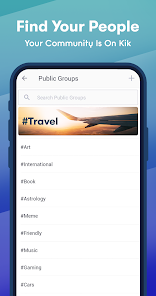
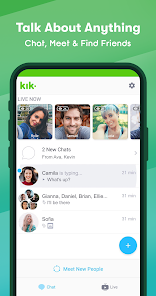
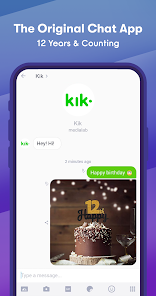
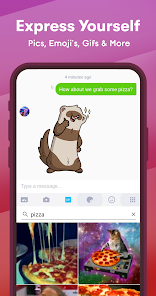




Kik is a popular messaging and chat app that allows users to connect with friends and meet new people through its unique chat features. With a user-friendly interface, Kik enables seamless communication via text, images, and videos. The app also offers a variety of bots and games, enhancing the chatting experience. Designed for privacy, Kik allows users to chat without sharing their phone numbers, making it a safe and fun platform for social interaction.
Features & Highlights
Kik — Messaging & Chat App offers a unique blend of features that cater to today’s communication needs, making it a popular choice among users. Here are some of its core features that stand out:
- Anonymity & Privacy: Kik allows users to communicate without revealing their phone numbers. This is particularly useful for those who value their privacy and do not want to share personal information. For instance, I often use Kik to chat with friends I met online, and it feels reassuring to know that my phone number remains protected.
- Rich Media Sharing: The app supports sending images, videos, and even GIFs, making conversations more engaging. I remember sending a funny GIF to a friend during a boring meeting, which instantly lightened the mood and sparked a fun conversation.
- Group Chats: Kik allows users to create group chats with up to 50 members, facilitating conversations among larger circles of friends or colleagues. I recently created a group for my book club, where we shared thoughts on our latest read, making it easy to keep everyone in the loop.
- Kik Bots: The app features various bots that can assist with different tasks, from playing games to providing news updates. I found a trivia bot that helped me learn new facts while having fun with friends during a weekend hangout.
- Customizable Chat Experience: Kik enables users to personalize their chat backgrounds and notifications, enhancing the overall user experience. I love changing my chat themes based on seasons or holidays, making my conversations feel fresh and exciting.
Real Experience Using Kik — Messaging & Chat App
Application Scenarios
Everyday life presents numerous opportunities to use Kik. Whether I'm coordinating plans for a weekend outing or catching up with friends after a long day, Kik has become my go-to messaging app. I often find myself in group chats, organizing events or simply sharing memes and jokes that keep the conversation lively. Recently, while planning a surprise birthday party for a close friend, Kik's group chat feature allowed us to brainstorm ideas and share images of potential venues, all in real-time. This collaboration made the planning process enjoyable and efficient.
User Experience
The user interface of Kik is intuitive and user-friendly, which makes it easy for anyone to navigate. Upon opening the app, the chat list is prominently displayed, showcasing ongoing conversations. Sending a message is as simple as tapping on a friend’s name and typing away. The performance is smooth, with notifications appearing promptly, ensuring that I never miss a message. One aspect I particularly enjoy is the seamless integration of media sharing; sending a photo or video takes just a few taps, and the quality remains high. Overall, Kik provides a pleasant and engaging user experience, making communication feel effortless.
Pricing
Kik is free to download and use, which is a significant advantage for users looking for a cost-effective messaging solution. The application does not charge for sending messages or sharing media, allowing for unlimited communication without the burden of monthly fees. However, users should be aware of optional in-app purchases, which can enhance their experience if desired.
Updates & Support
Kik frequently rolls out updates to improve functionality and introduce new features, which is a positive aspect of the app. Their support team is readily accessible through the app, providing assistance for any issues that may arise. I once encountered a minor glitch while using a bot, and the support team responded promptly, resolving my issue within a day. This level of customer service enhances my overall satisfaction with the app.
Security & Privacy Review
As a user, security and privacy are paramount, especially when using a messaging app like Kik. The app can be found on both the App Store and Google Play, which adds a layer of credibility. During registration, Kik requires only a username and password, which means that users can remain anonymous and keep their personal information private.
However, it’s essential to be mindful of the app's tracking behavior. Kik does display ads, and while they are not overly intrusive, there is potential for data collection. The company states that it does not share personal information with third parties without consent, but as with any app, users should remain cautious and review privacy settings regularly.
In conclusion, Kik — Messaging & Chat App is a robust platform that excels in providing a blend of privacy, multimedia sharing, and engaging user interactions. My experiences with Kik have been overwhelmingly positive, and I appreciate the continuous updates and support that enhance my overall usage. If you're looking for a fun, secure, and versatile messaging app, Kik might just be the perfect choice for you!
Pros 
-
 Kik offers seamless messaging
 - Engage in group chats easily
- Share media with friends fast
- Discover new users nearby
- Enjoy anonymity and privacy
Cons 
-
 Limited user verification
 - Frequent privacy concerns
- Inadequate content moderation
- Lacks advanced features
 Google Play
  App Store
 FAQ
Can I submit suggestions or feedback to Kik?
Yes, Kik encourages users to submit feedback through their support channels or directly within the app.
Does Kik collect my personal data?
Kik collects some personal data, such as your username and chat history, but it does not require a phone number for registration.
Does Kik support offline use?
Kik requires an internet connection to send and receive messages, so offline use is not supported.
How do I cancel my Kik subscription?
Since Kik doesn’t have a subscription service, there's nothing to cancel; just stop using the app if you wish.
How much does a subscription to Kik cost?
Kik does not have a subscription model; it is free to use with optional in-app purchases.
How to use Kik — Messaging & Chat App
How can I contact Kik's customer service?
You can reach Kik's customer service through their app by navigating to the settings and selecting "Help," or visit their support page online.
How do I activate my Kik account?
Download the Kik app, enter your desired username, email, and password, then follow the prompts to verify your email address to activate your account.
How do I log in to my Kik account?
Open the Kik app, enter your username or email and password, then tap "Log In." If you forgot your password, use the "Forgot Password?" link.
What is Kik's customer service number?
Kik does not provide a direct customer service number; they primarily offer support through their app and website.
Similar Apps














You May Like

Skype
Communication
4.3

UC Browser-Safe, Fast, Private
Communication
4.4

TextNow: Call + Text Unlimited
Communication
4.6

GroupMe
Communication
4.6

LINE: Calls & Messages
Communication
3.6

Firefox: el navegador privado
Communication
4.6

Brave Private Web Browser, VPN
Communication
4.7

Burner: Second Phone Number
Communication
4.4

Cafe - Live video chat
Communication
4.6

CallApp: Caller ID & Block
Communication
4.4

Coco - Live Video Chat HD
Communication
3.1

Contacts
Communication
4.3