
 Home
Home  Apps
Apps  Games
Games  Windows
  Topics
  Terms of Service
  Cookies & Privacy Policy
  Disclaimer
Planta: Plant & Garden Care


Information
- Category: House & Home
- Price: free
- Age Rating: Everyone
- Rating: 4.2
- Developer: Planta AB
- Version: 2.45.0
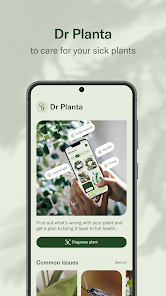
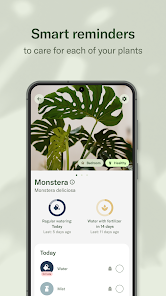
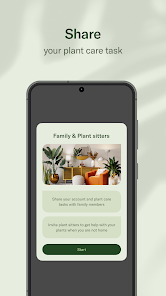
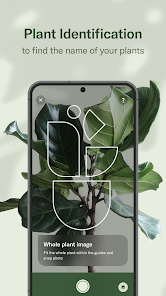
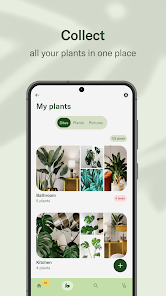
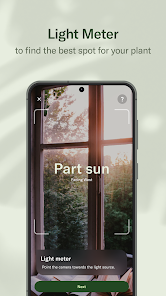
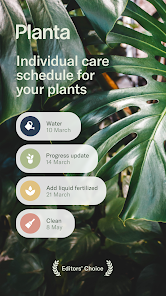
Planta: Plant & Garden Care is your ultimate companion for nurturing plants and gardens. Designed for both novice and experienced gardeners, this app offers personalized care reminders, plant identification, and expert tips to help you cultivate a thriving green space. With a user-friendly interface, Planta simplifies plant care, ensuring your greenery flourishes. Whether you’re tending to houseplants or outdoor gardens, Planta empowers you to grow with confidence and enjoy the beauty of nature.
Features of "Planta: Plant & Garden Care"
"Planta: Plant & Garden Care" is a comprehensive app designed to assist plant enthusiasts in nurturing their green companions. One of its standout features is the personalized care schedule, which provides tailored reminders for watering, fertilizing, and repotting based on the specific needs of each plant species. This ensures that users can maintain optimal care without the risk of over or under-watering.
Another notable feature is the extensive plant database, which includes detailed information on a wide variety of plants, including their ideal growing conditions, common issues, and care tips. Users can easily identify plants using the app's plant recognition tool, making it simple to learn about new species. Additionally, the app offers a community forum where users can share experiences, ask questions, and connect with fellow plant lovers, fostering a sense of community.
Furthermore, "Planta" includes a journal feature that allows users to track their plants' growth and health over time, providing insights into their gardening journey. The app's user-friendly interface and visually appealing design make it accessible for both novice and experienced gardeners alike, making plant care an enjoyable and rewarding experience.
How to Use "Planta: Plant & Garden Care"
Using "Planta: Plant & Garden Care" is straightforward and user-friendly, making it accessible for all levels of plant enthusiasts. To get started, users need to download the app from their respective app store and create an account. Once registered, users can begin adding their plants by either searching the extensive database or utilizing the plant recognition feature to identify their greenery.
After adding plants, the app generates a personalized care schedule that includes reminders for watering, fertilizing, and other essential tasks. Users can customize these reminders based on their preferences and the specific needs of each plant. The app also allows users to log their plant care activities, helping them keep track of what has been done and when.
Additionally, users can explore the community section to engage with other plant lovers, share tips, and seek advice. The journal feature enables users to document their plants' growth and health, providing a visual record of their gardening journey. Overall, "Planta" simplifies plant care, making it easier for users to cultivate thriving indoor and outdoor gardens.
Pros & Cons of the App
"Planta: Plant & Garden Care" offers several advantages that make it a valuable tool for plant enthusiasts. One of the primary pros is its personalized care schedule, which helps users stay organized and ensures that their plants receive the attention they need. The extensive plant database is another significant benefit, providing users with a wealth of information about various species, including care tips and troubleshooting advice.
Moreover, the app's community feature fosters a sense of connection among users, allowing them to share experiences and learn from one another. The user-friendly interface and visually appealing design enhance the overall experience, making plant care enjoyable and accessible.
However, there are some cons to consider. Some users may find that the app's premium features require a subscription, which could be a drawback for those looking for a free solution. Additionally, while the plant recognition feature is helpful, it may not always be accurate, leading to potential misidentifications. Overall, while "Planta" has its limitations, its benefits often outweigh the drawbacks, making it a worthwhile investment for plant lovers.
Get Installation Details  Google Play
  App Store
Google Play App Store FAQ
Can I create playlists on Spotify?
Yes, users can create, share, and collaborate on playlists with friends.
Can I download music on Spotify?
Yes, premium users can download songs and playlists for offline listening.
Can I listen to Spotify offline?
Yes, premium users can listen to downloaded music offline without an internet connection.
Can I use Spotify on multiple devices?
Yes, you can use Spotify on multiple devices, but only one device can stream at a time.
Does Spotify have podcasts?
Yes, Spotify hosts a wide range of podcasts across various genres.
Similar Apps















You May Like

AlfredCamera Home Security app
House & Home
4.7

Rent. Apartments & Homes
House & Home
4.6

Zillow: Homes for Sale & Rent
House & Home
4.8

Vivint
House & Home
4.3

Home Planner AI: Room Interior
House & Home
4.0

Houzz - Home Design & Remodel
House & Home
4.7

Roku Smart Home
House & Home
4.4

ecobee
House & Home
4.3

Thumbtack: Hire Service Pros
House & Home
4.8

Taskrabbit - Handyman, Errands
House & Home
3.6

Trulia: Homes For Sale & Rent
House & Home
4.7

Redfin: Buy, Sell & Rent Homes
House & Home
4.7