
 Home
Home  Apps
Apps  Games
Games  Windows
  Topics
  Terms of Service
  Cookies & Privacy Policy
  Disclaimer
My OldBoy! - GBC Emulator


Information
- Category: Arcade
- Price: $3.99
- Age Rating: Everyone
- Rating: 3.9
- Developer: Pixel Respawn LLC
- Version:
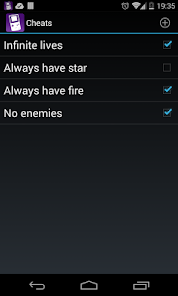
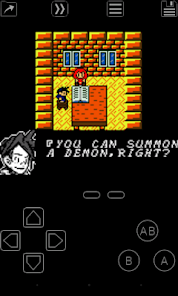
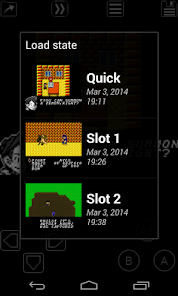
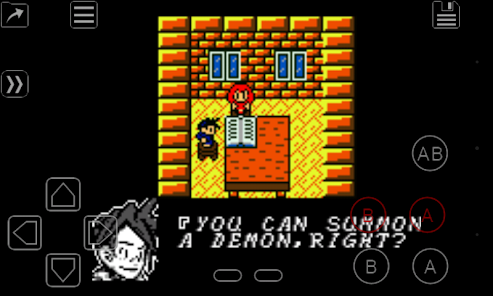
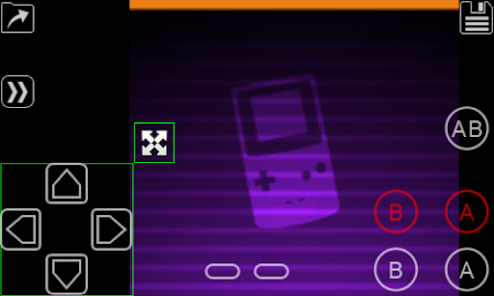
"My OldBoy! - GBC Emulator" is a powerful and user-friendly Game Boy Color emulator that brings classic gaming to your mobile device. With high compatibility, customizable controls, and support for save states, it allows you to relive your favorite GBC titles anytime, anywhere. Enjoy enhanced features like cheat codes, screen filters, and fast-forwarding options, making your gaming experience even more enjoyable. Dive into nostalgia and rediscover the magic of Game Boy Color games with My OldBoy!
Features of "My OldBoy! - GBC Emulator"
"My OldBoy! - GBC Emulator" is a highly regarded emulator for Game Boy Color (GBC) games, offering a plethora of features that enhance the gaming experience. One of its standout features is the ability to save and load game states at any point, allowing players to resume their adventures without losing progress. The emulator supports a wide range of GBC ROMs, ensuring compatibility with numerous titles from the classic library.
Another notable feature is the customizable controls, which enable users to adjust the on-screen buttons to their preference, making gameplay more comfortable. The emulator also includes a fast-forward option, allowing players to speed through sections of games, which is particularly useful for grinding or repetitive tasks. Additionally, "My OldBoy!" supports linking with other devices for multiplayer gaming, enhancing the social aspect of classic gaming. The emulator also boasts high-quality graphics and sound, providing an authentic retro experience while allowing for enhancements like shaders and filters.
Furthermore, it offers cheat code support, enabling players to utilize GameShark or Action Replay codes to modify gameplay. The emulator's user-friendly interface makes it easy to navigate through settings and game libraries, ensuring that both new and experienced users can enjoy their favorite GBC titles effortlessly.
How to Use "My OldBoy! - GBC Emulator"
Using "My OldBoy! - GBC Emulator" is a straightforward process that allows gamers to dive into their favorite Game Boy Color titles quickly. First, users need to download and install the emulator from a trusted source, ensuring they have the latest version for optimal performance. Once installed, the next step is to load GBC ROM files, which can be obtained from various online repositories. It’s essential to ensure that these ROMs are legally acquired to respect copyright laws.
After loading the ROMs, players can customize their gaming experience by adjusting the control layout to suit their preferences. The emulator provides options for both on-screen controls and external gamepads, making it versatile for different gaming styles. Users can also explore the settings menu to enable features like save states, fast-forwarding, and graphical enhancements, tailoring the emulator to their liking.
To start playing, simply select a game from the library and tap on it to launch. Players can save their progress at any time using the save state feature, which is particularly useful for challenging games. Additionally, the emulator allows for the use of cheat codes, which can be entered through the settings menu, providing an extra layer of fun and exploration. Overall, "My OldBoy!" is designed to be user-friendly, making it accessible for both newcomers and seasoned gamers alike.
Pros & Cons of the App
"My OldBoy! - GBC Emulator" comes with a variety of advantages that make it a popular choice among retro gaming enthusiasts. One of the primary pros is its extensive compatibility with a wide range of Game Boy Color titles, allowing users to relive their favorite childhood games. The emulator's ability to save and load game states enhances convenience, enabling players to pick up right where they left off. Additionally, the customizable controls and support for external gamepads provide flexibility, catering to different gaming preferences.
Another significant advantage is the inclusion of features like fast-forwarding and cheat code support, which can enhance gameplay and make challenging sections more manageable. The emulator's high-quality graphics and sound options also contribute to an immersive gaming experience, allowing players to enjoy classic titles with modern enhancements.
However, there are some drawbacks to consider. One of the main cons is that the emulator may not be entirely free, as certain features may require a paid version. Additionally, users may encounter occasional bugs or performance issues, particularly with less common ROMs. Furthermore, the legality of ROMs can be a concern, as downloading copyrighted games without permission is against the law. Overall, while "My OldBoy!" offers a fantastic way to enjoy GBC games, users should be mindful of these potential downsides.
Get Installation Details  Google Play
  App Store
Google Play App Store FAQ
Can I create playlists on Spotify?
Yes, users can create, share, and collaborate on playlists with friends.
Can I download music on Spotify?
Yes, premium users can download songs and playlists for offline listening.
Can I listen to Spotify offline?
Yes, premium users can listen to downloaded music offline without an internet connection.
Can I use Spotify on multiple devices?
Yes, you can use Spotify on multiple devices, but only one device can stream at a time.
Does Spotify have podcasts?
Yes, Spotify hosts a wide range of podcasts across various genres.
Similar Games















You May Like

Fairy Rush: Genetic Fusion
Arcade
4.3
Galaxy Attack: Shooting Game
Arcade
4.7

Hoard Master
Arcade
4.0

John GBA
Arcade
3.1

Kungfu Ragdoll
Arcade
4.6
M64Plus FZ Pro Emulator
Arcade
4.8
MD.emu (Genesis Emulator)
Arcade
4
Merge Super - Monster Fight
Arcade
4.6
My Boy! - GBA Emulator
Arcade
4.0
Pizza Boy A Pro
Arcade
4.8
Pizza Boy C Pro
Arcade
4.5

RESET Collection
Arcade
4.1