

One of the standout features of the ID.me Authenticator is its simplicity and efficiency in managing multifactor authentication (MFA). This app provides a user-friendly interface that ensures secure access to various services without the hassle of remembering multiple passwords.
Using the ID.me Authenticator has become second nature in my daily routine. Whether I’m logging into my bank account, accessing government services, or confirming my identity for healthcare appointments, this app is always there to facilitate secure access. Just the other day, I needed to file my taxes online. With ID.me, I was able to authenticate my identity in seconds, ensuring that my sensitive financial information remained safe from prying eyes.
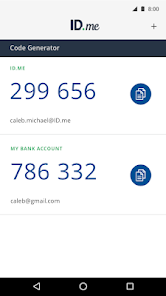
The user interface of the ID.me Authenticator is sleek and intuitive. Upon opening the app, I am greeted with a clean dashboard that displays all my accounts and their corresponding codes. Navigating through the app feels effortless, and the overall workflow is designed for convenience. The codes refresh every 30 seconds, and I appreciate how quickly I can retrieve them without any lag. Overall, my experience has been positive; I feel a sense of security knowing my accounts are protected with a reliable tool that doesn’t compromise on usability.
One of the great aspects of ID.me Authenticator is that it’s completely free to use. There are no hidden fees or premium features that require payment. This makes it accessible to anyone who needs a reliable authentication solution, whether for personal use or professional applications.
ID.me frequently updates its app to enhance security features and improve user experience. I’ve noticed that they actively listen to user feedback, implementing changes that genuinely make a difference. Their customer support is also commendable; I reached out once with a question about account recovery, and the response was prompt and helpful, which left me feeling valued as a user.
As a user in the United States, security and privacy are paramount concerns when it comes to apps like ID.me Authenticator. The app is available on both the App Store and Google Play, which assures users of its legitimacy and adherence to platform regulations. During the registration process, the app does require some personal data, but it’s minimal. I had to verify my identity through a secure process, which included providing my phone number and email. This level of verification is essential, considering the sensitive nature of the services it protects.
Importantly, ID.me Authenticator does not bombard users with ads or engage in intrusive tracking behaviors. This is a relief, as many free apps often monetize through unwanted advertisements. The app focuses solely on providing a secure environment for its users, and I appreciate that it respects my privacy. Overall, I feel confident using ID.me Authenticator, knowing that my data is safe, and my privacy is respected.

 Enhances security with multi-factor authentication for your accounts. Streamlines identity verification for quick and easy access. User-friendly interface simplifies the authentication process. Compatible with various services, increasing convenience and accessibility. Supports secure document storage for added peace of mind.
 Limited compatibility with certain devices and operating systems can hinder access. Users may face challenges during the identity verification process, causing frustration. The reliance on mobile devices can exclude those without smartphones. Frequent updates may disrupt user experience and create confusion.
 ID.me Authenticator does not collect personal data from users; it only generates and stores the necessary information to facilitate two-factor authentication for your accounts.
Yes, ID.me Authenticator is available as a free app without any trial period, allowing users to access its core functionalities without any cost.
No, ID.me Authenticator does not require an internet connection to generate one-time codes, as it uses time-based algorithms to create codes that work offline.
You can contact support or send feedback for ID.me Authenticator through the app's settings section, where you will find options to reach customer support or provide your feedback directly.
Since ID.me Authenticator is a free app without a subscription model, there is no need to manage or cancel a subscription. You can simply uninstall the app if you choose not to use it anymore.
Your customer number is typically found in your ID.me account settings or welcome email after registration.
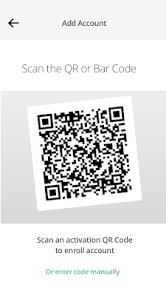
To activate, download the ID.me Authenticator app, scan the QR code provided during the setup process on the ID.me website, and follow the on-screen instructions.
You can reach ID.me customer service through their support page on the ID.me website or by calling their customer support number listed there.
To log in, visit the ID.me website or app, enter your email and password, and follow the prompts to authenticate if needed.











 Google Play
  App Store