



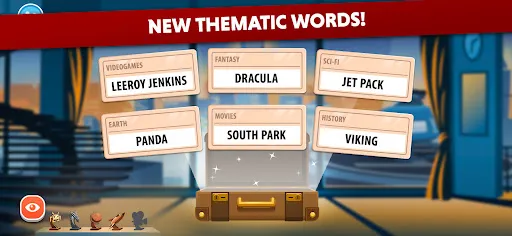
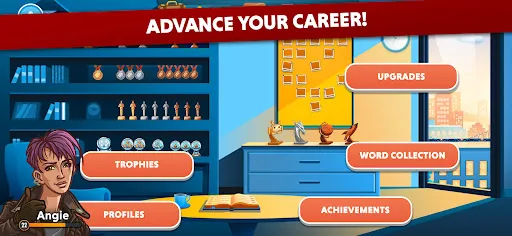



"Codenames" is a popular word-based party game that emphasizes teamwork and deduction. One of its primary features is the dual-team structure, where players split into two teams, each led by a spymaster. The spymasters provide one-word clues to help their teammates identify the correct words on the board, which are represented by codenames. The game includes a grid of 25 words, and players must avoid words that belong to the opposing team and a deadly assassin word that ends the game if chosen.
Another notable feature is the simplicity of the rules, making it accessible to players of all ages. The game encourages strategic thinking and communication, as players must interpret clues and discuss their reasoning. Additionally, "Codenames" offers various versions, including "Codenames: Pictures" and "Codenames: XXL," catering to different preferences and group sizes. The game is designed for 4 to 8 players, but it can accommodate larger groups with some adjustments. Overall, "Codenames" combines fun, strategy, and social interaction, making it a favorite for game nights.
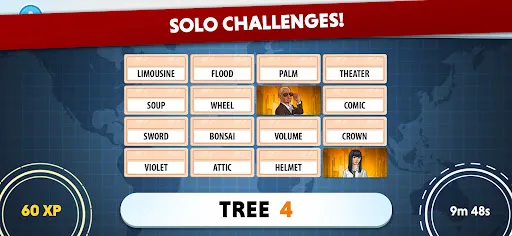
To play "Codenames," start by dividing players into two teams, each with a spymaster and field operatives. The game begins with a 5x5 grid of 25 random words placed face up on the table. The spymasters draw a key card that indicates which words correspond to their team, which are marked in red or blue, as well as neutral words and the assassin. The spymasters take turns giving one-word clues and a number that indicates how many words relate to that clue.
For example, if the spymaster says "ocean 2," the team might guess two words related to the ocean. The field operatives discuss and make guesses, touching the words they believe are correct. If they guess a word belonging to their team, it is covered with their team's color; if they guess a neutral word, it is covered with a beige card, and if they choose the assassin, their team loses immediately. The game continues until one team successfully identifies all their words or one team picks the assassin. This blend of strategy and communication makes "Codenames" an engaging experience for players.
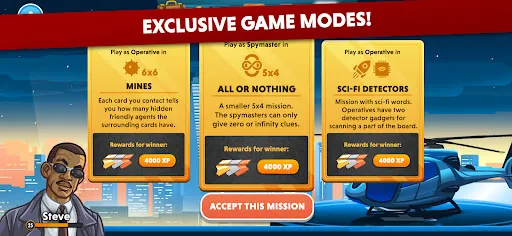
The "Codenames" app offers several advantages, making it a convenient option for players who enjoy the game digitally. One of the main pros is accessibility; players can enjoy the game on their smartphones or tablets, allowing for easy setup and play without the need for physical components. The app also includes various modes, such as solo play and online multiplayer, enabling users to connect with friends or play against AI opponents. Additionally, the digital version often features beautiful graphics and sound effects that enhance the gaming experience.
However, there are some cons to consider. One drawback is that the app may not fully replicate the social interaction and atmosphere of playing in person, which is a significant part of the game's charm. Furthermore, some users may experience technical issues or bugs, which can disrupt gameplay. Lastly, while the app is generally affordable, it may not provide the same value as the physical game, especially for those who prefer the tactile experience of handling cards and components. Overall, the "Codenames" app is a great alternative for fans of the game, but it may not replace the traditional experience for everyone.

 Codenames encourages teamwork and communication among players. It enhances critical thinking and word association skills. The game is quick to learn and easy to play. Codenames offers high replayability with varied setups. It fosters a fun and social atmosphere during gameplay.
 Codenames can become confusing with too many words on the board. The game requires a good grasp of language and word associations. Players may feel left out if they struggle with clue-giving.
  Google Play
  App Store
 Yes, Codenames encourages users to submit suggestions and feedback through their support channels or in-app feedback options to help improve the game.
Codenames has a privacy policy that outlines data collection practices, which typically include minimal personal information necessary for gameplay and account management.
Yes, Codenames allows for offline play, enabling users to enjoy the game without an internet connection once downloaded.
Users can cancel their Codenames subscription through the app settings or the account management section of the official website, following the provided instructions.
The subscription cost for Codenames varies based on the plan chosen, typically offering monthly and yearly options at competitive rates.
Customer numbers cannot be changed once activated. If you have concerns, please reach out to customer service for further assistance.
Yes, you can update your email address in your account settings after logging in. If you face any issues, please contact customer service for help.
You can reach customer service by visiting our website and using the contact form or calling the support number listed in the Help section.
To activate your account, follow the link sent to your email during registration. If you didn’t receive it, check your spam folder or contact customer service for a resend.
Simply go to the Codenames website and enter your email and password. If you encounter issues, ensure your credentials are correct, or contact customer service.