
 Home
Home  Apps
Apps  Games
Games  Windows
  Topics
  Terms of Service
  Cookies & Privacy Policy
  Disclaimer
Pococha - ライブ配信を楽しもう!生放送 アプリ!


Information
- Category: Social
- Price: Share
- Age Rating: Teen
- Rating: 4.0
- Developer: DeNA Co., Ltd.
- Version: 7.1.0
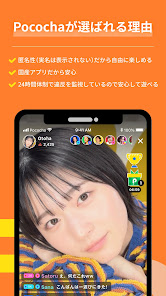
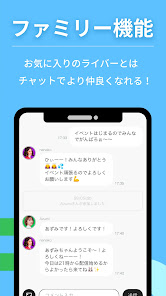
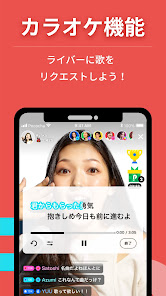

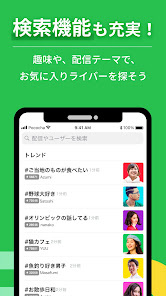
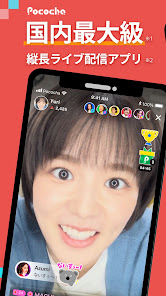

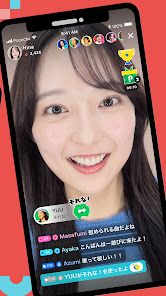
"Pococha" is a vibrant live streaming app that connects users through engaging broadcasts and interactive experiences. Whether you're a viewer or a broadcaster, Pococha offers a platform to share your passions, showcase your talents, and build a community. Enjoy real-time interactions, support your favorite creators, and discover diverse content from around the world. Join the fun and immerse yourself in the dynamic world of live streaming with Pococha!
Features of "Pococha - ライブ配信を楽しもう!生放送 アプリ!"
Pococha is a dynamic live streaming application that allows users to engage in real-time broadcasts. One of its standout features is the interactive chat function, which enables viewers to communicate directly with streamers, fostering a sense of community. Users can send virtual gifts to their favorite broadcasters, enhancing the experience and providing a way to support content creators financially.
The app also offers a user-friendly interface, making it easy for both streamers and viewers to navigate. Streamers can customize their profiles and set up their streams with various themes and backgrounds, allowing for a personalized touch. Additionally, Pococha includes a ranking system that motivates streamers to improve their content and engage more with their audience. Regular events and challenges are also held, providing opportunities for streamers to gain visibility and rewards.
Moreover, Pococha supports a diverse range of content, from gaming and music to lifestyle and educational streams, catering to a wide audience. The app is available on both iOS and Android platforms, ensuring accessibility for a broad user base.
How to Use "Pococha - ライブ配信を楽しもう!生放送 アプリ!"
Using Pococha is straightforward and user-friendly. First, download the app from the App Store or Google Play Store and create an account. You can sign up using your email or social media accounts, which makes the process quick and easy. Once registered, you can explore various live streams or start your own broadcast.
To start streaming, tap the "Go Live" button, where you can set up your stream by choosing a title, category, and any special effects you want to use. Engage with your audience by responding to comments in real-time, and encourage viewers to send virtual gifts to enhance interaction. You can also join existing streams to watch and interact with other users, which helps build community connections.
Additionally, take advantage of the app's features like challenges and events to increase your visibility. Regularly updating your content and interacting with your audience will help you grow your following and improve your streaming experience. Remember to check the app for updates and new features to maximize your use of Pococha.
Pros & Cons of the App
Pococha offers several advantages that make it appealing to both streamers and viewers. One of the main pros is its interactive nature, allowing real-time communication between broadcasters and their audience. This fosters a strong sense of community and engagement, which is essential for building a loyal following. The app's user-friendly interface also makes it accessible for newcomers, while the variety of content available caters to diverse interests.
However, there are some drawbacks to consider. One potential con is the competitive environment, where streamers may feel pressured to constantly produce high-quality content to stand out. Additionally, while the app is free to use, some features may require in-app purchases, which could deter users who prefer completely free platforms. Lastly, the reliance on virtual gifts for income can be unpredictable, making it challenging for streamers to rely solely on Pococha for financial support.
In summary, while Pococha provides a vibrant platform for live streaming with numerous features that enhance user experience, it also presents challenges that users should be aware of before diving in.
Get Installation Details  Google Play
  App Store
Google Play App Store FAQ
Can I create playlists on Spotify?
Yes, users can create, share, and collaborate on playlists with friends.
Can I download music on Spotify?
Yes, premium users can download songs and playlists for offline listening.
Can I listen to Spotify offline?
Yes, premium users can listen to downloaded music offline without an internet connection.
Can I use Spotify on multiple devices?
Yes, you can use Spotify on multiple devices, but only one device can stream at a time.
Does Spotify have podcasts?
Yes, Spotify hosts a wide range of podcasts across various genres.
Similar Apps














You May Like

Facebook Lite
Social
4.5

Tagged - Meet, Chat & Dating
Social
4.1

Grindr - Gay Dating & Chat
Social
3.4

Monkey - make new friends
Social
3.8

Text Free: Second Phone Number
Social
4.4

Clubhouse
Social
4.4

GETTR
Social
4.3

Amino: Communities and Fandom
Social
3.6

BaconReader Premium for Reddit
Social
4.5

BeReal. Your friends for real.
Social
4.4

Bigo Live - Live Streaming App
Social
4.5

BuzzCast - Live Video Chat App
Social
4.3