
 Home
Home  Apps
Apps  Games
Games  Windows
  Topics
  Terms of Service
  Cookies & Privacy Policy
  Disclaimer
Clubhouse


Information
- Category: Social
- Price: free
- Age Rating: Teen
- Rating: 4.4
- Developer: Alpha Exploration Co.
- Version: 26.01.20
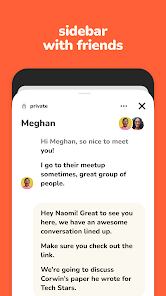
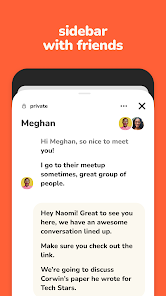
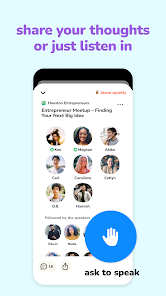
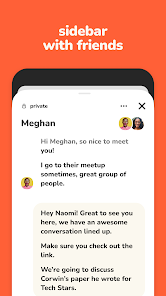
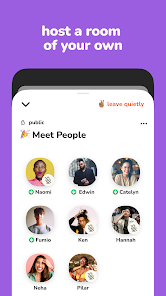

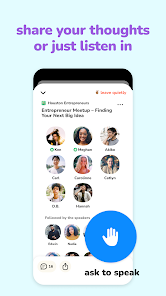
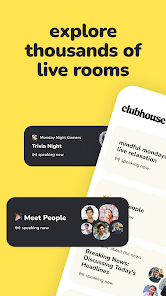
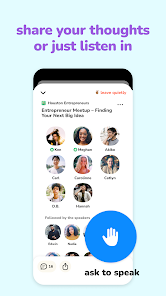
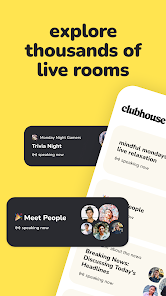
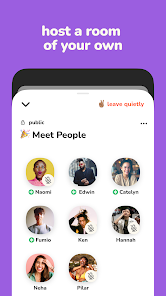


Clubhouse is an audio-based social networking app that allows users to join virtual rooms for live discussions on various topics. Launched in 2020, it gained popularity for its unique format, enabling spontaneous conversations and networking opportunities. Users can listen, participate, or host discussions, fostering a sense of community and real-time interaction. The app emphasizes voice over text, creating an engaging platform for sharing ideas and connecting with others globally.
Features & Highlights
Clubhouse has taken the social media scene by storm, offering a unique audio-only platform that transforms the way we connect and communicate. Here are some of the standout features that make Clubhouse a compelling choice for those looking to engage in lively discussions and share ideas.
- Live Audio Rooms: Step into real-time conversations with people from around the world. Whether you're joining a book club or a tech talk, the spontaneity of live audio creates an engaging atmosphere. For instance, one evening, I participated in a room where authors discussed their writing processes, allowing me to ask questions directly and learn from their experiences.
- Clubs and Topics: Create or join clubs based on your interests to curate discussions that matter to you. I joined a club focused on mindfulness, and it became my go-to space for sharing tips and practices with like-minded individuals. Each session felt like a support group where everyone contributed their insights.
- Stage and Audience Dynamics: The platform allows for a unique speaker-audience relationship, where selected speakers can share their thoughts while others listen and raise their hands to join the conversation. I attended a panel discussion on entrepreneurship, where the speakers shared their journeys while the audience could chime in, enriching the dialogue.
- Notifications and Events: Get alerts about rooms and events that align with your interests, ensuring you never miss out on discussions. I found this feature particularly useful for staying updated on live interviews with industry leaders, making it easy to jump in when my favorite speakers were on stage.
- Accessibility Features: Clubhouse is committed to inclusivity, offering various accessibility tools to ensure everyone can participate. I appreciated the efforts made for hearing-impaired users, including captions in some rooms, which allowed more people to join the discussion.
Real Experience Using Clubhouse
Application Scenarios
During my first month of using Clubhouse, I discovered countless scenarios where the app fit seamlessly into my daily routine. Mornings often began with a cup of coffee while I tuned into a room dedicated to personal development. Listening to motivational speakers sharing their experiences set a positive tone for my day. Lunchtime became an opportunity to explore niche topics, like sustainable living, where I could learn from experts without committing to a lengthy podcast. Evenings turned into social hours where I would join friends in a casual chat, discussing everything from pop culture to career advice. Clubhouse transformed these mundane moments into enriching experiences, making it a vital part of my day.
User Experience
The user interface of Clubhouse is refreshingly simple and intuitive. Upon logging in, I was greeted with a clean layout showcasing active rooms and suggested topics tailored to my interests. Navigating between rooms felt seamless; I could easily jump from one conversation to another with just a tap. The feature that truly stood out was the ability to engage with speakers by raising my hand, allowing for a real sense of participation. Performance-wise, the app was stable, and I never encountered significant lag or connectivity issues, which is crucial for an audio-based platform. Overall, my experience felt organic and engaging, almost as if I were attending a live event rather than just scrolling through an app.
Pricing
One of the best aspects of Clubhouse is that it is completely free to use. There are no hidden costs or subscriptions required to access the multitude of rooms and clubs available. This makes it accessible for everyone, from casual listeners to those who want to dive deep into specialized discussions. While there have been mentions of potential monetization features in the future, the current structure allows users to explore and participate without financial barriers.
Updates & Support
Clubhouse has shown a commitment to continuous improvement and user feedback. The developers frequently release updates that enhance performance and introduce new features. I’ve noticed improvements in the notification system, which now better highlights events that match my interests. In terms of support, the app provides an extensive help center with FAQs and troubleshooting tips. I reached out once for assistance with a technical issue and received a prompt and helpful response, which added to my overall positive experience.
Security & Privacy Review
As a user of Clubhouse, security and privacy are paramount to my experience. The app is available on both the App Store and Google Play, ensuring a trusted source for downloads. When registering, I was required to provide minimal personal data, which included my name and phone number. This commitment to limited data collection is a relief, especially considering the growing concerns around privacy in social media platforms.
Regarding ads and tracking behavior, Clubhouse currently does not feature intrusive advertisements, which is a significant plus. They have stated that they are committed to user privacy and transparency. However, like many free apps, there may be some level of tracking to enhance user experience. Thankfully, the developers are open about their practices, allowing users to make informed decisions about their participation.
Overall, my experience with Clubhouse has been overwhelmingly positive. The app not only provides a unique platform for engaging discussions but also prioritizes user experience, making it a valuable addition to the social media landscape.
Pros 
-
 Experience live audio chats
 - Engage in diverse topics daily
- Connect with global speakers
- Join rooms that spark ideas
- No video distractions allowed
Cons 
-
 Limited user control over rooms
 - Lack of content moderation tools
- No option for text-based chats
- Exclusivity can hinder growth
 Google Play
  App Store
 FAQ
Can I submit suggestions or feedback to Clubhouse?
Yes, users can submit feedback via the app or their official website to help improve the platform.
Does Clubhouse collect my personal data?
Yes, Clubhouse collects personal data, including your phone number and contacts, to enhance user experience.
Does Clubhouse support offline use?
No, Clubhouse requires an internet connection to access live audio rooms and participate in discussions.
How do I cancel my Clubhouse subscription?
If you've subscribed to any services, you can cancel through your app store settings or the Clubhouse app itself.
How much does a subscription to Clubhouse cost?
Clubhouse itself is free, but they may introduce premium features in the future. Always check within the app for updates.
How to use Clubhouse
How can I contact Clubhouse customer service?
You can reach Clubhouse customer service through the app's settings or their official website for support options.
How do I activate my Clubhouse account?
After signing up, check your SMS for a verification code to activate your account. Enter it in the app to complete the process.
How do I log in to my Clubhouse account?
Open the app, tap 'Log In,' and enter your phone number to receive a verification code.
Is there a customer service number for Clubhouse?
Clubhouse does not have a dedicated customer service number; support is accessed through the app or website.
Similar Apps















You May Like

Facebook Lite
Social
4.5

Tagged - Meet, Chat & Dating
Social
4.1

Grindr - Gay Dating & Chat
Social
3.4

Monkey - make new friends
Social
3.8

Text Free: Second Phone Number
Social
4.4

GETTR
Social
4.3

Amino: Communities and Fandom
Social
3.6

BaconReader Premium for Reddit
Social
4.5

BeReal. Your friends for real.
Social
4.4

Bigo Live - Live Streaming App
Social
4.5

BuzzCast - Live Video Chat App
Social
4.3

Chamet - Live Chat & Party
Social
4.0