
 Home
Home  Apps
Apps  Games
Games  Windows
  Topics
  Terms of Service
  Cookies & Privacy Policy
  Disclaimer


Information
- Category: Social
- Price: free
- Age Rating: Teen
- Rating: 4.6
- Developer: Meta Platforms, Inc.
- Version:




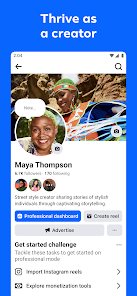
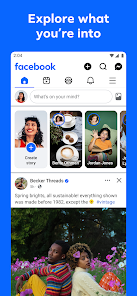


Facebook is a social networking app that connects people worldwide, allowing users to share updates, photos, and videos, and engage with friends and communities. Launched in 2004, it enables users to create profiles, join groups, and discover content tailored to their interests. With features like Messenger for instant communication and a news feed for real-time updates, Facebook fosters connections and facilitates social interactions, making it a central hub for online communication and community building.
Features & Highlights
Facebook has long been a staple in the social media landscape, and its features reflect its adaptability and breadth. Here are some core highlights that make the app a go-to platform for millions:
- News Feed: A dynamic stream of posts from friends, family, and pages you follow. Imagine scrolling through your News Feed on a lazy Sunday afternoon, catching up on your best friend's recent vacation photos or engaging with thought-provoking articles shared by your favorite influencers.
- Groups: A space to connect with like-minded individuals. Whether you're passionate about gardening or looking for local hiking buddies, the Groups feature allows you to join communities that align with your interests, fostering connections that extend beyond the digital realm.
- Marketplace: A convenient platform for buying and selling goods locally. Picture this: you need a new coffee table, and within minutes, you find several options from neighbors in your area, all while chatting directly with sellers through the app.
- Events: A handy tool for discovering and organizing gatherings. From local concerts to virtual meetups, the Events feature keeps you in the loop. I recently used it to RSVP to a community picnic, which not only helped me plan my weekend but also connected me with new friends.
- Messenger Integration: Seamlessly chat with friends without leaving the app. After scrolling through posts, I often find myself clicking on Messenger to catch up with a friend about a new movie we both want to see, making communication effortless and immediate.
Real Experience Using Facebook
Application Scenarios
Using Facebook has become an integral part of my daily routine. In the mornings, I often check the app to see what my friends are up to and to get a glimpse of trending news. This helps me start conversations during my coffee break at work, making social interactions feel more connected. Additionally, I frequently use the Groups feature to participate in discussions related to my hobbies, like photography or cooking, which not only enhances my skills but also introduces me to new friends with similar interests. After work, I often browse the Marketplace to find deals on items I need, such as furniture or tech gadgets, making it a handy tool for my shopping needs.
User Experience
The user interface of Facebook is intuitive and user-friendly. Navigation is straightforward, with a well-organized layout that allows for easy access to various features. The News Feed is beautifully designed, showcasing images and videos clearly, which enhances engagement with posts. I appreciate the algorithm that customizes content based on my interactions, ensuring that I see posts that genuinely interest me. Performance-wise, the app runs smoothly on my device, with minimal loading times even during peak hours. Overall, my experience has been positive; I feel connected and engaged every time I open the app, whether I’m sharing a life update or simply scrolling through my friends' posts.
Pricing
Facebook is free to use, which is one of its biggest draws. The platform generates revenue mainly through advertisements. Users can enjoy all functionalities without paying a dime, making it accessible to a wide audience. The occasional ads are tailored based on user interests, which can be a double-edged sword. While they provide relevant content, some users may find them intrusive.
Updates & Support
Facebook is continuously evolving, with regular updates that enhance functionality and security features. The support system is fairly robust, offering help articles and a community forum for troubleshooting issues. I’ve encountered minor glitches in the past, but the responsive support team has always resolved my inquiries promptly. This level of ongoing improvement and user support is reassuring and contributes to my overall satisfaction with the app.
Security & Privacy Review
Security and privacy are paramount concerns for American users of the Facebook app. The app is available on both the App Store and Google Play, ensuring a legitimate source for downloads. However, registration requires personal information, such as your name, email, and date of birth, which may raise concerns for some users about how this data is utilized.
Facebook has faced scrutiny over its data privacy practices, particularly regarding ads and tracking behavior. While the platform employs targeted advertising based on user activity, many users are cautious about how their information is shared with third parties. Facebook does provide privacy settings that allow users to control who sees their content and how their data is used. However, navigating these settings can be overwhelming for some, leading to a sense of vulnerability regarding personal information. Overall, while Facebook offers a wealth of connectivity and features, users must remain vigilant about their privacy settings to ensure a secure experience.
Pros 
-
 Connect with friends easily
 - Share updates and photos
- Join groups and communities
- Discover events and activities
- Access news and live videos
Cons 
-
 Privacy concerns arise often
 - Ads can be intrusive and annoying
- Algorithm limits content reach
- Constant updates can confuse users
 Google Play
  App Store
 FAQ
Can I submit suggestions or feedback to Facebook?
Yes, users can submit suggestions and feedback through the Help Center or by using the feedback option in the app.
Does Facebook collect my personal data?
Yes, Facebook collects personal data to improve user experience and serve personalized ads. Users can manage privacy settings.
Does Facebook support offline use?
Facebook allows limited offline use, such as viewing previously loaded content, but full functionality requires an internet connection.
How do I cancel my Facebook subscription?
To cancel any paid services, go to your account settings, find the subscription section, and follow the cancellation process.
How much does a subscription to Facebook cost?
Facebook does not require a subscription fee; it is completely free to use.
How to use Facebook
How do I activate my Facebook account?
If you’re setting up a new account, follow the sign-up prompts and verify your email or phone number. If reactivating, log in with your credentials.
How do I contact Facebook customer service?
You can reach Facebook customer service through the Help Center on their website or by using the "Report a Problem" feature within the app.
How do I find my Facebook customer number?
Facebook does not provide a customer number; instead, you can access support through their Help Center or by reporting issues directly.
How do I log in to my Facebook account?
Open the Facebook app, enter your email or phone number, and your password, then tap "Log In."
Similar Apps















You May Like

Facebook Lite
Social
4.5

Tagged - Meet, Chat & Dating
Social
4.1

Grindr - Gay Dating & Chat
Social
3.4

Monkey - make new friends
Social
3.8

Text Free: Second Phone Number
Social
4.4

Clubhouse
Social
4.4

GETTR
Social
4.3

Amino: Communities and Fandom
Social
3.6

BaconReader Premium for Reddit
Social
4.5

BeReal. Your friends for real.
Social
4.4

Bigo Live - Live Streaming App
Social
4.5

BuzzCast - Live Video Chat App
Social
4.3