

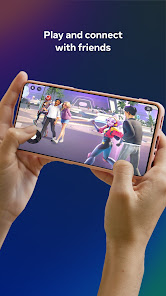
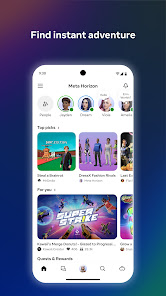
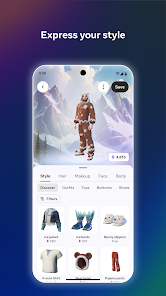
Meta Horizon is a cutting-edge virtual reality platform designed to create immersive social experiences. One of its standout features is the ability to create personalized avatars, allowing users to express themselves in unique ways. The platform supports a variety of environments, from serene landscapes to bustling urban settings, enabling users to explore and interact in diverse virtual worlds.
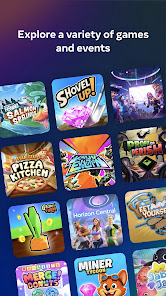
Another key feature is the integration of social tools, which facilitate communication and collaboration among users. This includes voice chat, text messaging, and interactive activities that encourage engagement. Additionally, Meta Horizon offers a range of games and experiences, catering to different interests and age groups, making it a versatile platform for entertainment.
Moreover, the platform emphasizes user-generated content, allowing individuals to create and share their own experiences, further enriching the community. With regular updates and enhancements, Meta Horizon aims to provide a dynamic and evolving environment that keeps users coming back for more.
Using Meta Horizon is a straightforward process that begins with creating an account. Users can download the app on compatible devices, including VR headsets and smartphones. Once registered, individuals can customize their avatars to reflect their personalities, choosing from a variety of features such as clothing, accessories, and physical attributes.
After setting up their avatars, users can explore the platform's various environments. Navigation is intuitive, allowing users to move freely and interact with others. To connect with friends or meet new people, users can join public or private rooms, participate in events, or engage in games. The platform also offers tutorials and guides to help newcomers familiarize themselves with its features.
For those interested in creating content, Meta Horizon provides tools for designing unique experiences, which can be shared with the community. Regular updates ensure that users have access to new features and experiences, enhancing the overall enjoyment of the platform.
Meta Horizon offers several advantages that make it an appealing choice for users seeking virtual social experiences. One of the primary benefits is its immersive environment, which allows users to engage in a lifelike manner, fostering meaningful connections. The platform's extensive customization options for avatars and environments also enhance user engagement, making each experience unique.
Additionally, the app's focus on user-generated content encourages creativity and collaboration, allowing users to share their creations with the community. The variety of activities and games available caters to diverse interests, ensuring that there is something for everyone. However, there are some drawbacks to consider. The requirement for specific hardware, such as VR headsets, may limit accessibility for some users.
Moreover, the platform can be overwhelming for newcomers due to its vast array of features and options. Privacy concerns may also arise, as users interact with others in a virtual space. Overall, while Meta Horizon provides an innovative and engaging experience, potential users should weigh these pros and cons before diving in.

 Seamless integration with Meta's ecosystem enhances user experience. Access to a wide range of immersive VR content keeps users engaged. User-friendly interface simplifies navigation for all skill levels. Regular updates ensure the app stays current with new features. Community support fosters connection and collaboration among users.
 Limited content library may restrict user experience and engagement. Compatibility issues with certain devices can hinder accessibility and usability. Frequent updates may disrupt usage and lead to frustration among users.
  Google Play
  App Store
 Yes, users can submit suggestions or feedback through the app’s support section or via official Meta channels for user input.
Yes, the app may collect personal data for account management and personalized experiences, but it adheres to privacy policies to protect user information.
Yes, Meta Quest App allows some offline functionalities, but certain features may require an internet connection for full access and updates.
You can cancel your subscription to Meta Quest App through the account settings within the app or by visiting the subscription management section of your app store.
Subscription costs for Meta Quest App can vary depending on the plan, typically ranging from monthly to yearly options, with specific pricing details available within the app.
Yes, you can activate your Meta Horizon account through the mobile app by following the prompts after downloading it.
You can reach customer service through the support section in the app or visit the Meta Horizon website for chat and email options.
Contact customer service with your account details, and they will assist you in updating your customer number.
Your customer number can typically be found in your account settings or on your account confirmation email.
Activation usually occurs within a few minutes, but it can take longer if there are any issues. Check your email for updates.