
 Home
Home  Apps
Apps  Games
Games  Windows
  Topics
  Terms of Service
  Cookies & Privacy Policy
  Disclaimer
Likee - Short Video Community


Information
- Category: Social
- Price: 0
- Age Rating: Teen
- Rating: 4.4
- Developer: Likeme Pte. Ltd.
- Version: 5.34.2

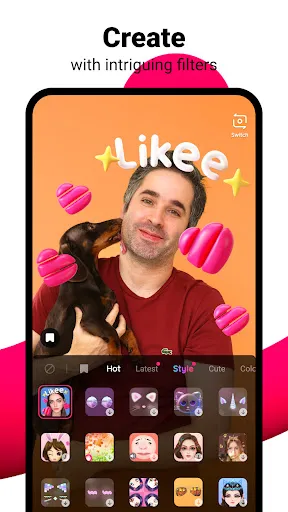
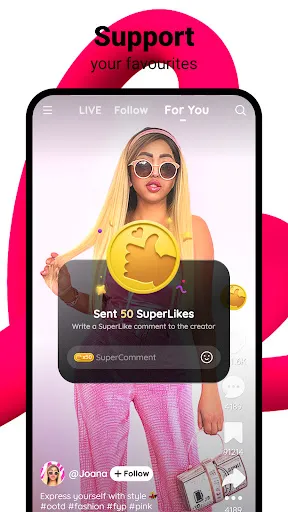
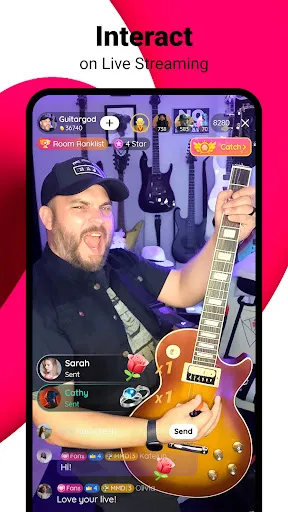
Likee is a dynamic short video community app that allows users to create, share, and discover engaging content. With a variety of editing tools, effects, and music options, users can express their creativity and connect with a global audience. Whether you're showcasing your talents, participating in challenges, or exploring trending videos, Likee offers an interactive platform for entertainment and social connection. Join millions of users and unleash your creativity in a vibrant video-sharing environment!
Features of "Likee - Short Video Community"
Likee is a dynamic platform designed for creating and sharing short videos, offering a variety of features that enhance user experience. One of its standout features is the extensive library of special effects and filters, allowing users to add creativity to their videos. The app also includes a powerful video editing tool that enables users to trim, merge, and adjust their clips seamlessly.
Another notable feature is the live streaming option, which allows users to interact with their audience in real-time. This fosters a sense of community and engagement among users. Additionally, Likee offers a personalized feed that curates content based on user preferences, ensuring that users discover videos that resonate with their interests.
Furthermore, Likee supports a variety of content genres, from dance and comedy to educational and DIY videos, catering to a diverse audience. The app also includes a social networking aspect, enabling users to follow, comment, and share videos, thus enhancing connectivity within the community.
How to Use "Likee - Short Video Community"
Using Likee is straightforward and user-friendly, making it accessible for individuals of all ages. To get started, download the app from your device's app store and create an account using your email or social media profiles. Once registered, you can explore the app's interface, which is designed for easy navigation.
To create your first video, tap the camera icon and choose from various recording options, including different speeds and effects. After recording, you can utilize the editing tools to enhance your video with filters, music, and text overlays. Once satisfied with your creation, simply hit the upload button to share it with the Likee community.
Engaging with other users is also simple; you can follow creators, like their videos, and leave comments to foster interaction. Additionally, you can participate in challenges and trends to increase your visibility within the app. Overall, Likee provides a platform that encourages creativity and social interaction.
Pros & Cons of the App
Likee - Short Video Community comes with several advantages that make it appealing to users. One of the primary pros is its vast array of editing tools and effects, which allow for creative expression. The app's user-friendly interface makes it easy for newcomers to navigate and create content. Additionally, the live streaming feature enhances real-time interaction, fostering a sense of community among users.
However, Likee is not without its drawbacks. One significant concern is the presence of inappropriate content, which can be a downside for younger audiences. The app also faces competition from other platforms like TikTok, which may limit its growth and user retention. Furthermore, some users have reported issues with privacy and data security, raising concerns about the safety of personal information.
In summary, while Likee offers a vibrant platform for video creation and sharing, potential users should weigh its pros and cons carefully, especially regarding content moderation and privacy issues. Overall, it remains a popular choice for those looking to engage in short-form video content.
Get Installation Details  Google Play
  App Store
Google Play App Store FAQ
Can I create playlists on Spotify?
Yes, users can create, share, and collaborate on playlists with friends.
Can I download music on Spotify?
Yes, premium users can download songs and playlists for offline listening.
Can I listen to Spotify offline?
Yes, premium users can listen to downloaded music offline without an internet connection.
Can I use Spotify on multiple devices?
Yes, you can use Spotify on multiple devices, but only one device can stream at a time.
Does Spotify have podcasts?
Yes, Spotify hosts a wide range of podcasts across various genres.
Similar Apps















You May Like

Facebook Lite
Social
4.5

Tagged - Meet, Chat & Dating
Social
4.1

Grindr - Gay Dating & Chat
Social
3.4

Monkey - make new friends
Social
3.8

Text Free: Second Phone Number
Social
4.4

Clubhouse
Social
4.4

GETTR
Social
4.3

Amino: Communities and Fandom
Social
3.6

BaconReader Premium for Reddit
Social
4.5

BeReal. Your friends for real.
Social
4.4

Bigo Live - Live Streaming App
Social
4.5

BuzzCast - Live Video Chat App
Social
4.3