


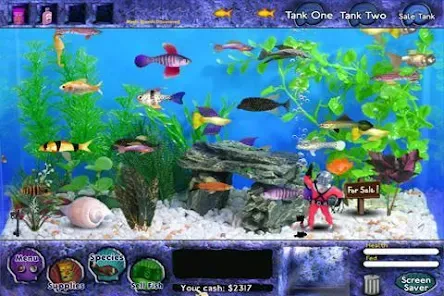
"Fish Tycoon" is a captivating simulation game that allows players to manage their own virtual aquarium. One of its standout features is the ability to breed and care for various species of fish, each with unique traits and characteristics. Players can experiment with different combinations to create new breeds, enhancing the gameplay experience. The game also includes a realistic ecosystem where players must maintain water quality, temperature, and food supply to keep their fish healthy and thriving.
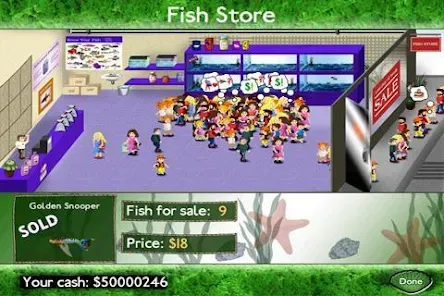
Another notable feature is the in-game store, where players can purchase upgrades and supplies to improve their aquarium. This includes items like decorations, food, and equipment that enhance the overall environment for the fish. The game operates in real-time, meaning that players must regularly check in to ensure their fish are well cared for, adding an element of time management to the gameplay. Additionally, "Fish Tycoon" offers a visually appealing interface with vibrant graphics that bring the underwater world to life, making it an engaging experience for players of all ages.
To get started with "Fish Tycoon," players first need to download the game on their preferred platform, whether it be a mobile device or a computer. Once installed, players can create their aquarium by selecting a tank size and layout. The initial step involves purchasing starter fish and setting up the tank environment, including water conditions and temperature. Players should familiarize themselves with the various fish species available and their specific care requirements to ensure a successful breeding process.
As the game progresses, players should regularly monitor their fish for health and happiness. This includes feeding them, cleaning the tank, and adjusting environmental factors as needed. Players can experiment with breeding different fish to discover new species, which adds depth to the gameplay. Additionally, players can visit the in-game store to buy upgrades and supplies that enhance their aquarium. Regular check-ins are essential, as the game operates in real-time, requiring players to stay engaged to maintain a thriving aquatic environment.
"Fish Tycoon" offers several advantages that make it an enjoyable simulation game. One of the primary pros is its engaging gameplay, which combines elements of strategy, management, and creativity. Players can immerse themselves in the process of breeding fish and creating a unique aquarium, which can be both relaxing and rewarding. The game's vibrant graphics and realistic fish behaviors enhance the overall experience, making it visually appealing. Additionally, the real-time aspect encourages players to stay connected and actively participate in their aquarium's upkeep.
However, there are some drawbacks to consider. One con is that the game can become repetitive over time, as the core mechanics may not change significantly. Players might find themselves performing similar tasks repeatedly, which could lead to boredom. Furthermore, the need for regular check-ins can be a downside for those with busy schedules, as neglecting the aquarium can result in fish dying or becoming unhealthy. Overall, while "Fish Tycoon" has its strengths, potential players should weigh these pros and cons before diving in.

 Engaging gameplay fosters strategic thinking and planning skills. Colorful graphics and animations create an immersive experience. Real-time simulation teaches responsibility and resource management. Diverse fish breeds encourage exploration and experimentation. User-friendly interface makes it accessible for all ages.
 Limited gameplay depth may lead to quick boredom. Graphics and interface may feel outdated for some players. Resource management can become frustrating without proper guidance.
  Google Play
  App Store
 Yes, players can submit suggestions or feedback through the app's support section or by contacting the developers via their official website or social media channels.
Fish Tycoon may collect certain data for gameplay purposes, but it generally adheres to privacy policies and regulations to protect user information.
Yes, Fish Tycoon can be played offline, allowing users to enjoy the game without needing a constant internet connection.
To cancel a Fish Tycoon subscription, you can go to your device's settings or app store account settings and follow the instructions for managing subscriptions.
The subscription cost for Fish Tycoon may vary by platform and region, so it's best to check the app store for the most current pricing information.
Yes, you can activate your account by entering your customer number during the registration process. If you need help, reach out to customer service.
To activate your account, follow the instructions in your confirmation email. If you have trouble, please contact customer service for support.
You can reach customer service by visiting our support page and filling out the contact form. We’ll get back to you as soon as possible.
To update your login information, log into your account and navigate to account settings. You can change your password and email there. If you need more help, contact customer service.
To log in, visit the homepage, enter your username and password, then click the login button. If you encounter issues, try resetting your password.