
 Home
Home  Apps
Apps  Games
Games  Windows
  Topics
  Terms of Service
  Cookies & Privacy Policy
  Disclaimer
Eventbrite App


Information
- Category: Entertainment
- Price: free
- Age Rating: Everyone
- Rating: 4.9
- Developer: Eventbrite
- Version: 10.46.0

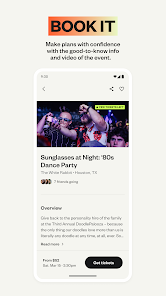
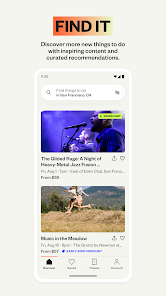
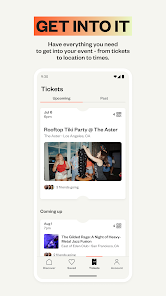
The Eventbrite app is your go-to platform for discovering and managing events in your area. Whether you're looking for concerts, festivals, workshops, or local gatherings, the app makes it easy to find and purchase tickets. With personalized recommendations, seamless ticketing, and the ability to create and promote your own events, Eventbrite connects you to experiences that matter. Stay updated and never miss out on exciting happenings around you!
Features of the Eventbrite App
The Eventbrite App offers a variety of features designed to enhance the event planning and attending experience. One of its primary functions is the ability to create and manage events seamlessly. Users can set up events, customize ticket types, and manage registrations all from their mobile devices. The app also provides tools for promoting events through social media integration, allowing users to share their events easily and reach a wider audience.
Another notable feature is the ticketing system, which allows attendees to purchase tickets directly through the app. Users can choose from different ticket options, including early bird and VIP tickets, making it easier for event organizers to cater to various audience segments. Additionally, the app includes a built-in calendar feature that helps users keep track of upcoming events and receive reminders.
For those attending events, the app offers a user-friendly interface to browse and discover local happenings based on interests and location. Users can also access event details, including venue information and schedules, ensuring they have all the necessary information at their fingertips. Overall, the Eventbrite App combines functionality and convenience, making it a valuable tool for both event organizers and attendees.
How to Use the Eventbrite App
Using the Eventbrite App is straightforward and user-friendly, making it accessible for everyone. To get started, download the app from the App Store or Google Play Store and create an account. Once registered, you can either browse for events in your area or create your own event. If you’re looking to attend an event, simply use the search function to find events that match your interests, and filter results by date, location, or category.
For event organizers, creating an event involves filling out essential details such as the event name, date, time, and location. You can also set ticket prices and types, and customize the event page with images and descriptions to attract attendees. After publishing your event, you can promote it through social media or email invitations directly from the app.
As an attendee, once you purchase a ticket, you can access your ticket directly in the app, which can be scanned at the event entrance. The app also allows you to save events to your calendar and receive notifications about any updates or changes. Overall, the Eventbrite App simplifies the process of discovering and managing events, making it a go-to platform for event enthusiasts.
Pros & Cons of the Eventbrite App
The Eventbrite App comes with several advantages that make it a popular choice for event management. One of the primary pros is its user-friendly interface, which allows both organizers and attendees to navigate the app with ease. The app’s comprehensive ticketing system is another significant benefit, enabling organizers to offer various ticket types and manage sales efficiently. Additionally, the promotional tools integrated into the app help increase visibility for events, making it easier to attract attendees.
However, there are some drawbacks to consider. One of the cons is that Eventbrite charges fees for ticket sales, which can cut into the profits for event organizers. This fee structure may deter some users from using the platform for smaller events. Furthermore, while the app is generally reliable, some users have reported occasional glitches or slow loading times, which can be frustrating when trying to access event information quickly.
In summary, while the Eventbrite App offers a robust set of features that facilitate event planning and attendance, potential users should weigh the associated costs and occasional technical issues against the benefits it provides. Overall, it remains a valuable tool for those looking to organize or attend events.
Get Installation Details  Google Play
  App Store
Google Play App Store FAQ
Can I create playlists on Spotify?
Yes, users can create, share, and collaborate on playlists with friends.
Can I download music on Spotify?
Yes, premium users can download songs and playlists for offline listening.
Can I listen to Spotify offline?
Yes, premium users can listen to downloaded music offline without an internet connection.
Can I use Spotify on multiple devices?
Yes, you can use Spotify on multiple devices, but only one device can stream at a time.
Does Spotify have podcasts?
Yes, Spotify hosts a wide range of podcasts across various genres.
Similar Apps















You May Like

PlutoTV: Live TV & Free Movies
Entertainment
3.7

Peacock TV: Stream TV & Movies
Entertainment
4.7

Lifetime: TV Shows & Movies
Entertainment
4.1

Telemundo: Series y TV en vivo
Entertainment
4.7

Prime Video
Entertainment
3.9

Hulu: Stream TV shows & movies
Entertainment
4.5

The Roku App (Official)
Entertainment
4.7

Bitmoji
Entertainment
4.5

AMC+
Entertainment
2.5

Akinator
Entertainment
4.6

Amazon Freevee: Free Movies/TV
Entertainment
4

CBS
Entertainment
3.8