
 Home
Home  Apps
Apps  Games
Games  Windows
  Topics
  Terms of Service
  Cookies & Privacy Policy
  Disclaimer
DoorDash: Food, Grocery, More


Information
- Category: Food & Drink
- Price: free
- Age Rating: Everyone
- Rating: 4.7
- Developer: DoorDash
- Version: 15.259.3
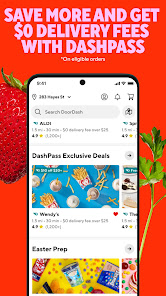
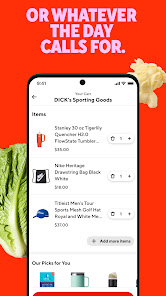
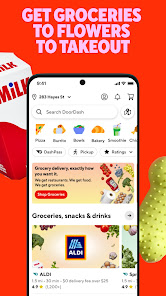
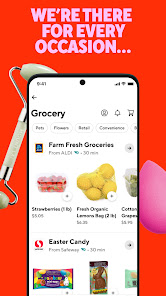
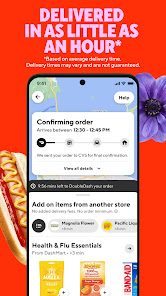
Discover the convenience of DoorDash, your go-to app for food delivery, grocery shopping, and more. With a vast selection of local restaurants and stores at your fingertips, you can satisfy your cravings and stock up on essentials with just a few taps. Enjoy fast, reliable delivery right to your door, making mealtime and shopping easier than ever. Experience the ultimate in convenience and choice with DoorDash—where food, grocery, and more come together seamlessly.
Features of "DoorDash: Food, Grocery, More"
"DoorDash: Food, Grocery, More" is a versatile app that connects users with a wide range of delivery services. One of its standout features is the extensive selection of restaurants and grocery stores available for delivery, allowing users to choose from local favorites to national chains. The app also offers real-time tracking, enabling customers to monitor their orders from the moment they are placed until they arrive at their doorstep.
Another notable feature is the DashPass subscription service, which provides users with free delivery on eligible orders for a monthly fee. This can be particularly beneficial for frequent users, as it helps save on delivery costs. Additionally, the app includes personalized recommendations based on user preferences and past orders, making it easier to discover new dining options. The user-friendly interface and seamless payment options further enhance the overall experience, ensuring that ordering food or groceries is quick and convenient.
How to Use "DoorDash: Food, Grocery, More"
Using "DoorDash: Food, Grocery, More" is a straightforward process that begins with downloading the app from your device's app store. Once installed, users need to create an account by providing basic information such as their name, email address, and payment details. After logging in, users can enter their delivery address to view available restaurants and grocery stores in their area.
To place an order, simply browse through the listings, select your desired items, and add them to your cart. Once you’re ready to check out, review your order, apply any promo codes if available, and confirm your payment method. After placing the order, you can track its progress in real-time through the app. Notifications will keep you updated on the status of your delivery, ensuring you know when to expect your food or groceries. Overall, the app is designed for ease of use, making it accessible for everyone.
Pros & Cons of the App
Like any service, "DoorDash: Food, Grocery, More" has its advantages and disadvantages. One of the primary pros is the vast selection of restaurants and grocery options, which caters to diverse tastes and preferences. The convenience of having food and groceries delivered directly to your door is another significant benefit, especially for those with busy lifestyles. Additionally, the app's user-friendly interface and real-time tracking enhance the overall experience, making it easy to navigate and stay informed about your order.
However, there are some cons to consider. Delivery fees can add up, particularly during peak hours or for smaller orders, which may deter some users. Additionally, the quality of service can vary depending on the delivery driver and the restaurant, leading to inconsistent experiences. Some users have also reported issues with order accuracy, such as missing items or incorrect orders. Overall, while "DoorDash" offers a convenient service, potential users should weigh these pros and cons before relying on the app for their food and grocery needs.
Get Installation Details  Google Play
  App Store
Google Play App Store FAQ
Can I create playlists on Spotify?
Yes, users can create, share, and collaborate on playlists with friends.
Can I download music on Spotify?
Yes, premium users can download songs and playlists for offline listening.
Can I listen to Spotify offline?
Yes, premium users can listen to downloaded music offline without an internet connection.
Can I use Spotify on multiple devices?
Yes, you can use Spotify on multiple devices, but only one device can stream at a time.
Does Spotify have podcasts?
Yes, Spotify hosts a wide range of podcasts across various genres.
Similar Apps














You May Like

베들레헴 성경 - Bethlehem Bible
Food & Drink
0

McDonald's
Food & Drink
2.6

Casey's
Food & Drink
4.0
Jersey Mike's
Food & Drink
4.8
Cracker Barrel
Food & Drink
4.5

Weee! Asian Grocery Delivery
Food & Drink
4.9

BURGER KING® App
Food & Drink
4.4

Chick-fil-A®
Food & Drink
4.5
Cocktail Party: Drink Recipes
Food & Drink
4.4

Crumbl
Food & Drink
4.8

Dunkin’
Food & Drink
4.6

Grubhub: Food Delivery
Food & Drink
4.5