




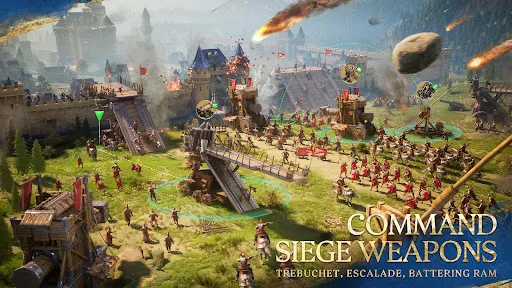




"Age of Empires Mobile" brings the beloved real-time strategy experience to mobile devices, allowing players to build civilizations, gather resources, and engage in epic battles on the go. One of the standout features is its intuitive touch controls, which have been optimized for mobile gameplay, making it easier for players to manage their armies and construct buildings. The game includes various civilizations, each with unique units and technologies, providing a diverse gameplay experience. Players can engage in both single-player campaigns and multiplayer modes, allowing for cooperative or competitive play with friends and other players worldwide.
The game also features stunning graphics and animations that bring the historical settings to life, enhancing the immersive experience. Regular updates and events keep the gameplay fresh, introducing new content and challenges. Additionally, players can customize their strategies by researching technologies and upgrading units, adding depth to the gameplay. The social features, such as alliances and chat options, foster community interaction, making it a more engaging experience. Overall, "Age of Empires Mobile" successfully captures the essence of the classic franchise while adapting it for mobile play.
To get started with "Age of Empires Mobile," first, download the game from your device's app store. Once installed, launch the game and create an account or log in using your existing credentials. The tutorial will guide you through the basic mechanics, including resource gathering, building construction, and unit management. Familiarize yourself with the user interface, which includes buttons for accessing your town center, military units, and research options.
As you progress, focus on gathering resources like food, wood, and gold to expand your civilization. Build structures that unlock new units and technologies, and strategize your military campaigns against AI opponents or other players. Participate in events and challenges to earn rewards and improve your civilization. Joining alliances can enhance your gameplay experience, allowing you to collaborate with other players. Regularly check for updates and new content to keep your gameplay experience fresh and exciting. With practice and strategy, you can lead your empire to greatness.
"Age of Empires Mobile" offers a range of advantages that appeal to both new players and veterans of the franchise. One of the primary pros is its accessibility; the game allows players to enjoy the classic Age of Empires experience on mobile devices, making it convenient for gaming on the go. The graphics are visually appealing, and the touch controls are user-friendly, enhancing the overall gameplay experience. Additionally, the variety of civilizations and multiplayer options provide depth and replayability, keeping players engaged over time.
However, there are some drawbacks to consider. One common concern is the potential for in-app purchases, which may create a pay-to-win environment, affecting the balance of competitive play. Some players may also find the mobile interface limiting compared to the PC version, which can impact strategic depth. Additionally, connectivity issues may arise during multiplayer matches, leading to frustration. Overall, while "Age of Empires Mobile" successfully adapts the franchise for mobile play, it is essential to weigh these pros and cons before diving into the game.

 Experience real-time strategy gaming on the go with Age of Empires Mobile. Enjoy a rich historical setting that immerses you in diverse cultures. Build and manage your empire with intuitive touch controls for easy gameplay. Engage in multiplayer battles to test your skills against friends and players worldwide. Regular updates ensure fresh content and challenges to keep you entertained.
 Limited graphics and performance compared to PC versions hinder immersive gameplay experiences. In-app purchases can lead to a pay-to-win environment, affecting fairness in competition. The mobile controls may feel clunky, making strategic maneuvers more challenging.
  Google Play
  App Store
 Yes, players can submit suggestions or feedback through the app's support section or official website, where developers often encourage community input.
Yes, the app may collect personal data in accordance with its privacy policy, which details what information is collected and how it is used.
Yes, Age of Empires Mobile offers offline gameplay options, allowing players to enjoy the game without an internet connection.
To cancel your subscription, you can go to your device's app store settings, find the subscription section, and follow the prompts to cancel.
The subscription cost for Age of Empires Mobile may vary based on the plan selected, typically offering monthly or annual options.
Unfortunately, Customer Numbers cannot be changed. If you have concerns, please contact Customer Service for further assistance.
Yes, you can log in using your social media account if you linked it during registration. If you face issues, contact Customer Service for guidance.
You can reach Customer Service through the in-game help menu or by visiting our support website. We’re here to help!
To activate your account, simply log in with your credentials. If you encounter issues, follow the activation instructions in the app or reach out to Customer Service.
You can report issues directly through the in-game support feature or by visiting our customer support website. We’re ready to assist you!